optuna.visualization.matplotlib.plot_parallel_coordinate
- optuna.visualization.matplotlib.plot_parallel_coordinate(study, params=None, *, target=None, target_name='Objective Value')[source]
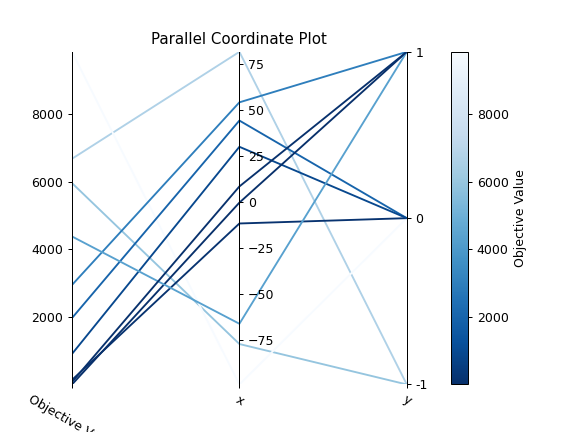
Plot the high-dimensional parameter relationships in a study with Matplotlib.
Note that, if a parameter contains missing values, a trial with missing values is not plotted.
See also
Please refer to
optuna.visualization.plot_parallel_coordinate()for an example.Example
The following code snippet shows how to plot the high-dimensional parameter relationships.
import optuna

def objective(trial):
    x = trial.suggest_float("x", -100, 100)
    y = trial.suggest_categorical("y", [-1, 0, 1])
    return x ** 2 + y


sampler = optuna.samplers.TPESampler(seed=10)
study = optuna.create_study(sampler=sampler)
study.optimize(objective, n_trials=10)

optuna.visualization.matplotlib.plot_parallel_coordinate(study, params=["x", "y"])
- Parameters
study (Study) – A
Studyobject whose trials are plotted for their target values.params (Optional[List[str]]) – Parameter list to visualize. The default is all parameters.
target (Optional[Callable[[FrozenTrial], float]]) –
A function to specify the value to display. If it is
Noneandstudyis being used for single-objective optimization, the objective values are plotted.Note
Specify this argument if
studyis being used for multi-objective optimization.target_name (str) – Target’s name to display on the axis label and the legend.
- Returns
A
matplotlib.axes.Axesobject.- Return type
Axes
Note
The colormap is reversed when the
targetargument isn’tNoneordirectionofStudyisminimize.Note
Added in v2.2.0 as an experimental feature. The interface may change in newer versions without prior notice. See https://github.com/optuna/optuna/releases/tag/v2.2.0.